For manufacturers and plant teams

Understand every line in the plant, even the ones nobody documented

Altitude reads the programs, drawings and documents behind every line, whoever wrote them, so maintenance, engineering and the integrators you hire start from the same understanding.
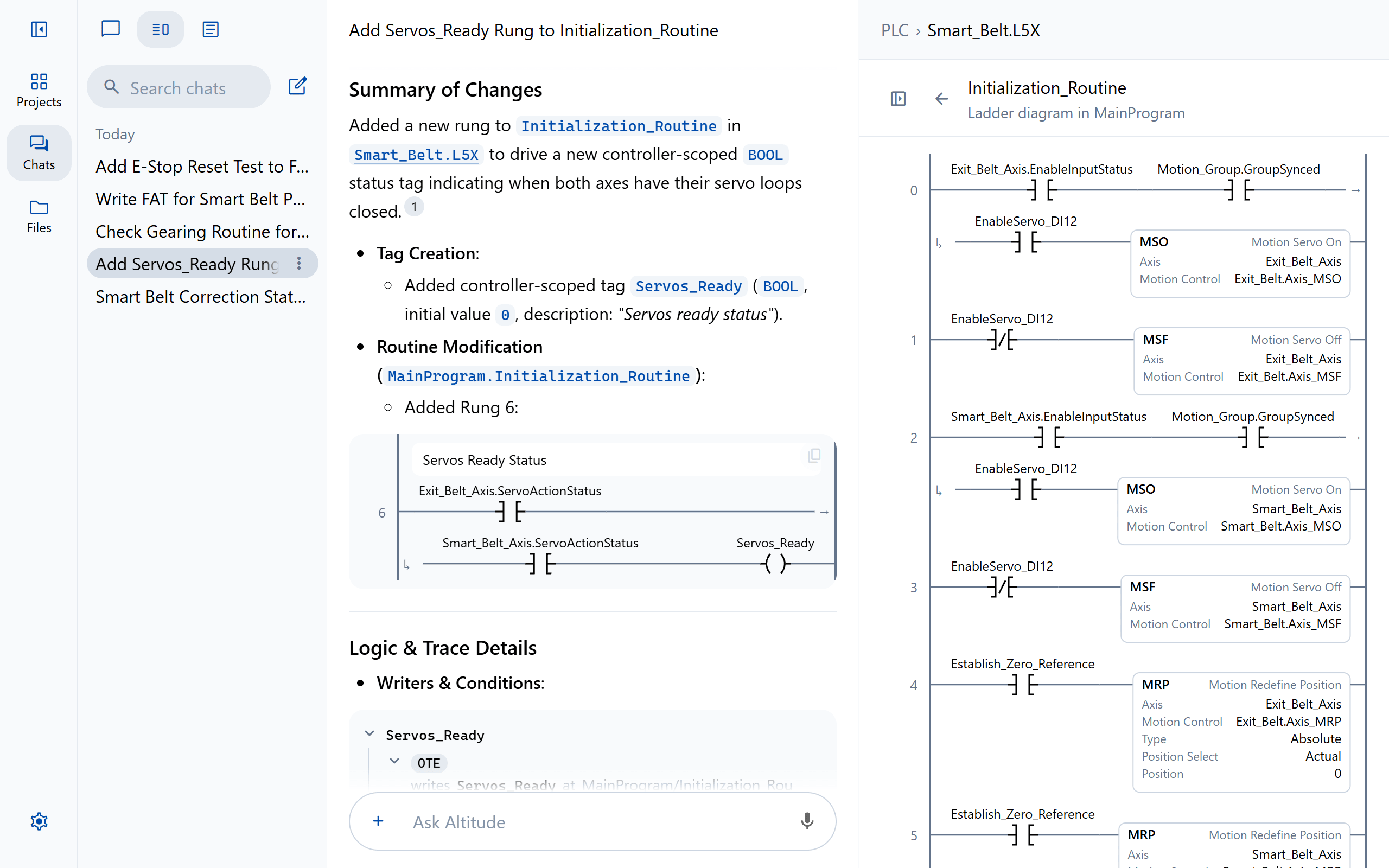
Altitude explaining a change to a ladder routine, beside the routine

The problem

Where the hours go

01

Knowledge retires with the people

The engineers who wrote the logic have moved on, and what they knew was never written down.

02

Downtime starts with a search

A fault means hunting through code, drawings and manuals while the line waits.

03

Decades of platforms

PLC-5s beside ControlLogix, S7-300s beside S7-1500s, and a robot from every decade.

Document what is already running

Write the sequence of operations, the control logic specification and a code reference from the programs themselves.
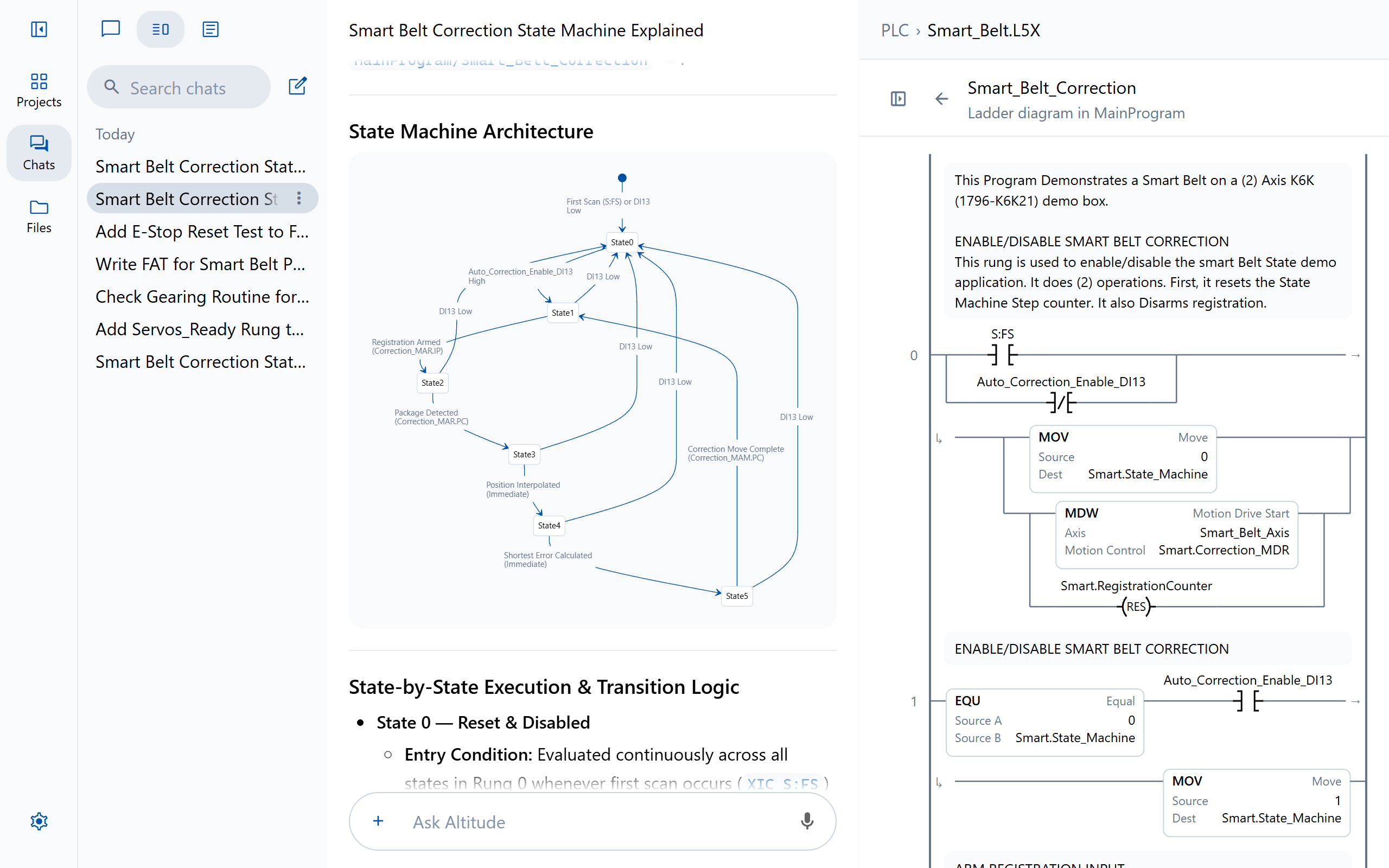
A state machine drawn from a ladder routine, beside the routine that runs it

Troubleshoot from the symptom

Describe the fault in the words you would use on the floor. Altitude traces it back through the logic and answers with the rung, the line and the page.
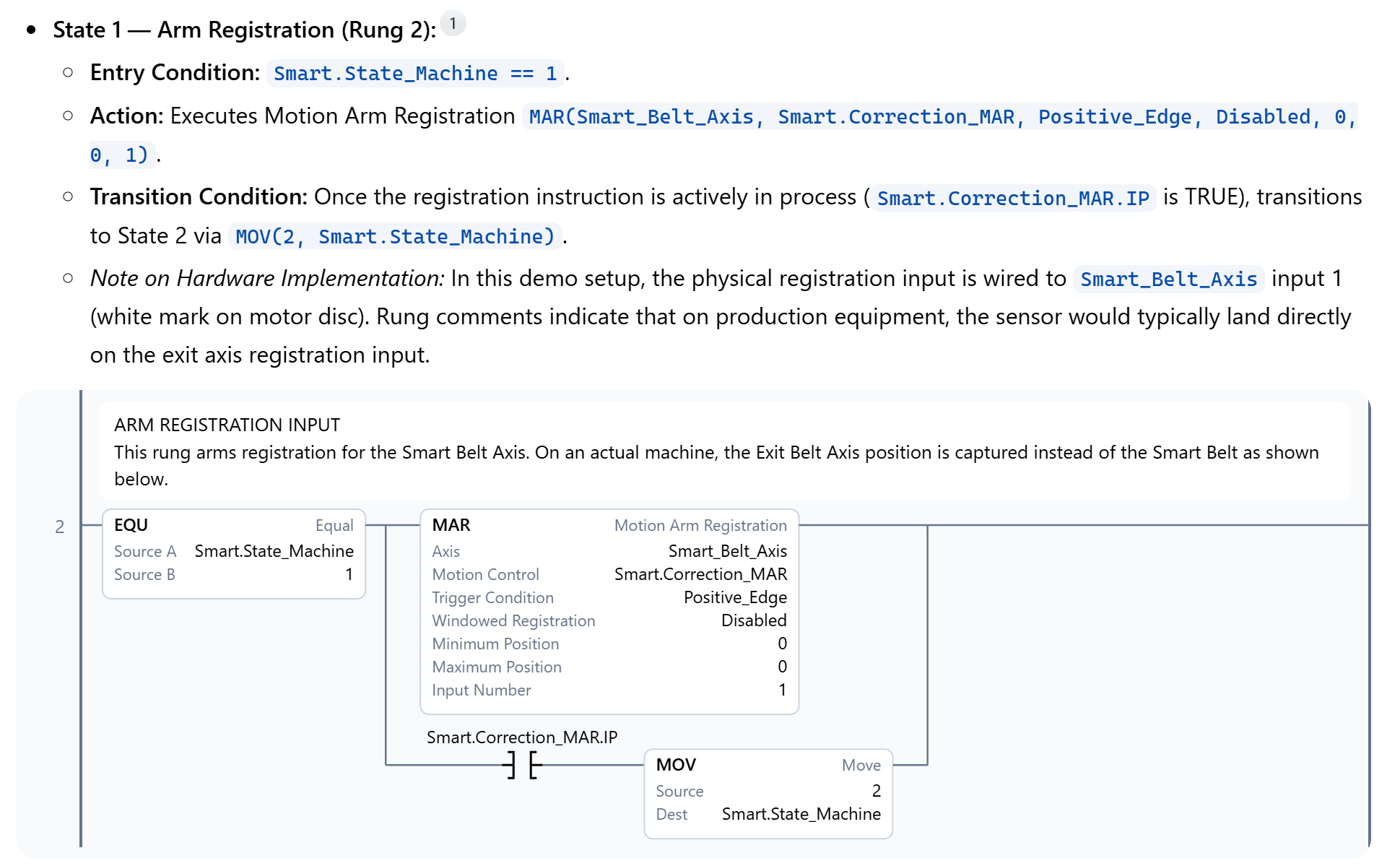
An answer explaining a motion registration rung, with the rung drawn as ladder and a citation to its routine

Plan the modernization

Move PLC-5, SLC 500, S5 and S7-300 programs onto current controllers, with a report of what carried across and what is left for the engineer.

Translate MainProgram/Infeed to

Studio 5000 Infeed_Conveyor.L5X · Ladder

0 INFEED CONVEYOR Start and stop seal-in, held off until both servos are ready. Start_PB Conveyor_Run Stop_PB Servos_Ready Conveyor_Run 1 JAM DETECTION A case held on the jam eye for 3 s times out the jam timer. Conveyor_Run Jam_Eye TON Timer On Delay Timer Jam_Timer Preset 3000 Accum 0 2 Jam_Timer.DN Jam_Alarm L

TIA Portal Infeed.scl · SCL

1// Infeed conveyor: start and stop seal-in2"Conveyor_Run" := ("Start_PB" OR "Conveyor_Run")3 AND NOT "Stop_PB" AND "Servos_Ready";4 5// Jam detection: 3 s on the jam eye6"Jam_Timer"(IN := "Conveyor_Run" AND "Jam_Eye", PT := T#3S);7 8// Jam alarm9IF "Jam_Timer".Q THEN10 "Jam_Alarm" := TRUE;11END_IF;

TwinCAT 3 Infeed.TcPOU · Structured text

1// Infeed conveyor: start and stop seal-in2Conveyor_Run := (Start_PB OR Conveyor_Run)3 AND NOT Stop_PB AND Servos_Ready;4 5// Jam detection: 3 s on the jam eye6Jam_Timer(IN := Conveyor_Run AND Jam_Eye, PT := T#3S);7 8// Jam alarm9IF Jam_Timer.Q THEN10 Jam_Alarm := TRUE;11END_IF

Translation report

Coverage 3 of 3 rungs translated

Decision Jam_Timer.DN is read as the IEC timer’s Q output

Address map 7 tags mapped, names kept

Know what is in every controller

Every version of every file, who changed it and why, a note of which version was loaded on which device, and whether it was approved at the time.

PLC › Line4_CasePacker.L5X File History
Approved by Priya Shah, v7 · Today 3:58 PM · “Door 3 checked on the rig.”
  1. Today

    1. Approved by Priya Shah

      In Line 4 PLC · Sam Rivera

    2. Note: Tested on the FAT rig

  2. Yesterday

    1. Downloaded by Sam Rivera

Changes in v7 Cell_Permissives · Rung 3 changed Before in red, after in green
3 RUN PERMISSIVE The cell may run only with every guard door closed and the safety system healthy. Door1_Closed Door2_Closed Safety_OK Run_Perm 3 RUN PERMISSIVE The cell may run only with every guard door closed and the safety system healthy. Door1_Closed Door2_Closed Door3_Closed Safety_OK Run_Perm
Asked in chat by Jordan Lee Restore v7 Download

FAQ

Questions teams ask first

Can Altitude document a system with no documentation?
Yes. It writes a sequence of operations, control logic specification or code reference from the PLC programs themselves, and diagrams each sequence.
Do changes from our integrators show up?
Every file uploaded to a project or changed in Altitude is saved as a version, with who made it and when, so you can compare it with what ran before.

Keep exploring

More ways teams use Altitude

See it on the work your team does every day

We'll walk through the workflows that matter most to your team, on the PLC, robot and HMI platforms you run, from review and troubleshooting to documents and migration.