For system integrators

More projects delivered by the engineers you already have

From the first quote to the signed SAT, Altitude does the reading, checking and writing that holds up your senior engineers, on whichever platforms each customer runs.
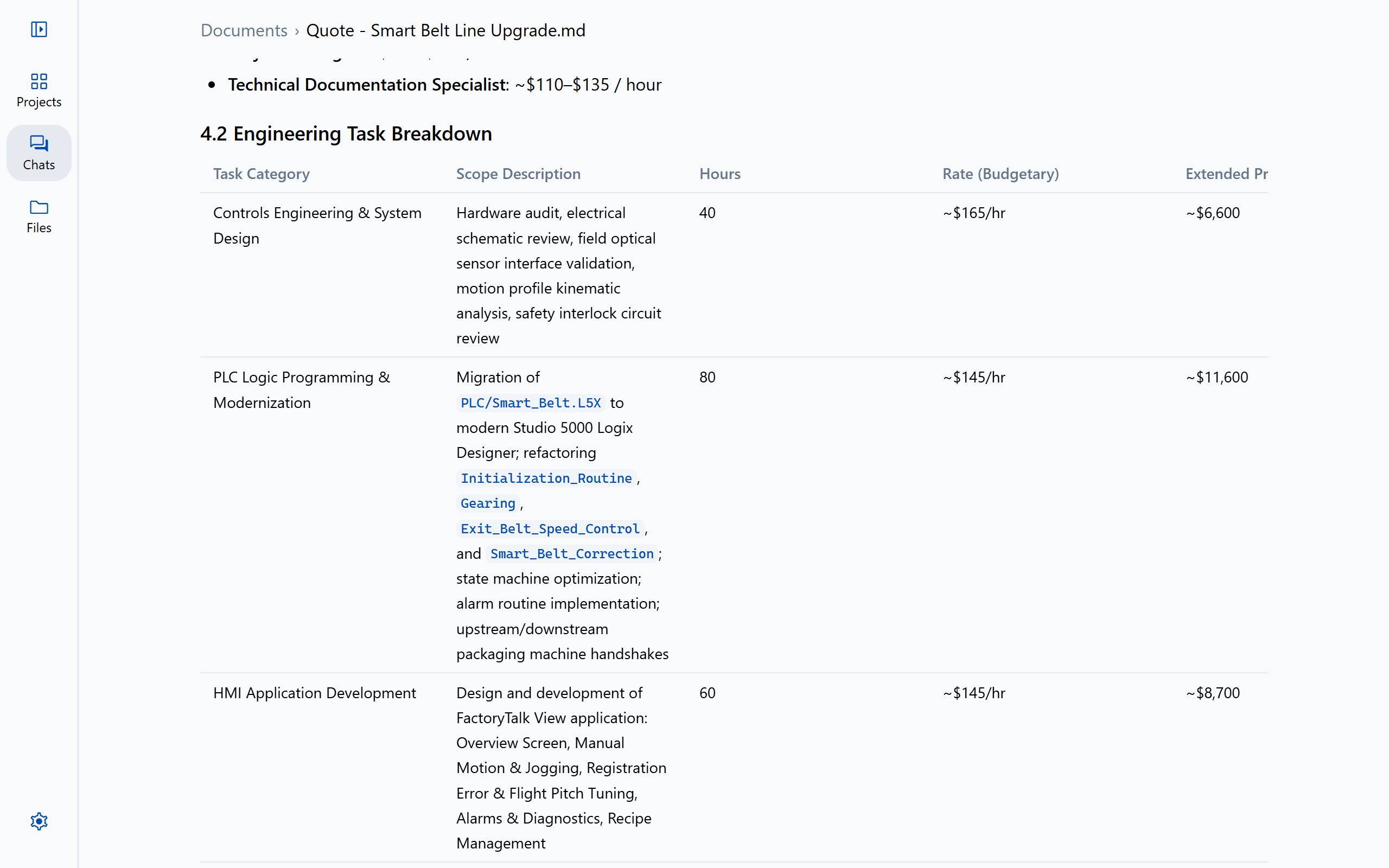
A quote Altitude wrote for a line upgrade, with each task’s scope, hours and rate

The problem

Where the hours go

01

Fixed bids, open-ended work

Reviews, I/O checks and documents grow with every change order, and the hours come out of the margin.

02

A different standard on every job

Each customer brings its own platforms, coding standards, naming rules and document templates.

03

Senior engineers are the bottleneck

Only a few people on the team can check a program, a drawing package and a robot cell end to end.

How it works

From first quote to signed SAT

  1. 1

    Quote

    Write quotes and proposals from the customer’s specification, with the scope broken down task by task.

  2. 2

    Design

    Check drawing packages for errors, extract the I/O list, and reconcile it against the PLC.

  3. 3

    Program

    Write and change PLC, robot and HMI code as redlines, held to the customer’s own standard.

  4. 4

    Commission

    Troubleshoot from the symptom back to the rung, and see each sequence step by step.

  5. 5

    Hand over

    Write the FAT, SAT, manuals and sequence of operations from what was built, with an approval record for every file.

Held to each customer’s standard

Add a customer’s coding and naming standards, or name IEC 61131-3, ISA-88 or PackML, and every review and every edit follows them.
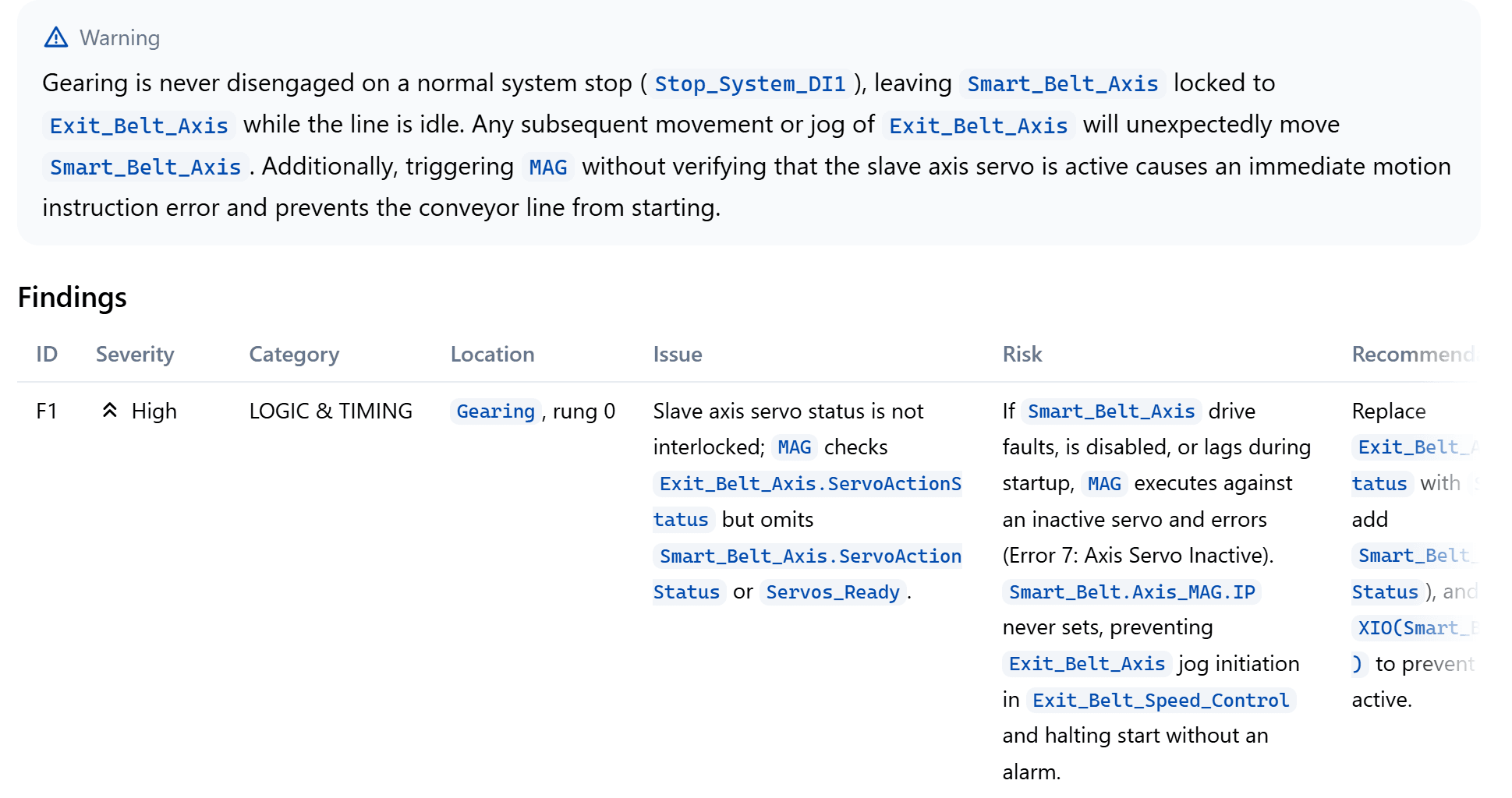
A review of a motion routine that leads with a warning, then a findings table with severity, location, risk and fix

A second pair of eyes on every change

Every change is a redline checked against the whole project. Ask a lead, or the customer’s engineer, to approve it, and hand over the record with the project.

PLC › Line4_CasePacker.L5X Waiting on Priya Shah Changes requested Approved
  1. JL Jordan Lee asked Priya Shah to approve v6 11:24 AM Tested the infeed on the FAT rig.
  2. PS Priya Shah requested changes to v6 1:10 PM Add door 3 to the run permissive too.
  3. JL Jordan Lee sent back v7 3:45 PM Door 3 added to rung 3 of Cell_Permissives.
  4. PS Priya Shah approved v7 3:58 PM Door 3 checked on the rig.
Approval record v7 · SHA-256 4e1c 9a07 … 2bd3 Download

Whichever platform the customer specifies

Rockwell, Siemens and Beckhoff PLCs, 19 robot brands and the major HMI platforms in one conversation, and code moved between them when the specification changes.

Translate MainProgram/Infeed to

Studio 5000 Infeed_Conveyor.L5X · Ladder

0 INFEED CONVEYOR Start and stop seal-in, held off until both servos are ready. Start_PB Conveyor_Run Stop_PB Servos_Ready Conveyor_Run 1 JAM DETECTION A case held on the jam eye for 3 s times out the jam timer. Conveyor_Run Jam_Eye TON Timer On Delay Timer Jam_Timer Preset 3000 Accum 0 2 Jam_Timer.DN Jam_Alarm L

TIA Portal Infeed.scl · SCL

1// Infeed conveyor: start and stop seal-in2"Conveyor_Run" := ("Start_PB" OR "Conveyor_Run")3 AND NOT "Stop_PB" AND "Servos_Ready";4 5// Jam detection: 3 s on the jam eye6"Jam_Timer"(IN := "Conveyor_Run" AND "Jam_Eye", PT := T#3S);7 8// Jam alarm9IF "Jam_Timer".Q THEN10 "Jam_Alarm" := TRUE;11END_IF;

TwinCAT 3 Infeed.TcPOU · Structured text

1// Infeed conveyor: start and stop seal-in2Conveyor_Run := (Start_PB OR Conveyor_Run)3 AND NOT Stop_PB AND Servos_Ready;4 5// Jam detection: 3 s on the jam eye6Jam_Timer(IN := Conveyor_Run AND Jam_Eye, PT := T#3S);7 8// Jam alarm9IF Jam_Timer.Q THEN10 Jam_Alarm := TRUE;11END_IF

Translation report

Coverage 3 of 3 rungs translated

Decision Jam_Timer.DN is read as the IEC timer’s Q output

Address map 7 tags mapped, names kept

FAQ

Questions teams ask first

Can we use our own document templates?
Yes. Give Altitude a template and a finished example, and it writes new documents on them, with your logos, headers and formatting.
Can a customer’s engineer approve our changes?
Yes. Anyone a project is shared with can approve. Ask the customer’s engineer for a second approval after your own, and download the approval record for the handover.
Does each customer’s standard stay with its project?
Name a standard in any request, or add a customer’s own, and reviews, edits and new code follow it.

Keep exploring

More ways teams use Altitude

See it on the work your team does every day

We'll walk through the workflows that matter most to your team, on the PLC, robot and HMI platforms you run, from review and troubleshooting to documents and migration.